Numen - AI NPCs for FNV
Summary
AI companions with long-term memory and NPC-to-NPC conversations.
Tags
Language
NUMEN — NPCs that think, talk, and remember
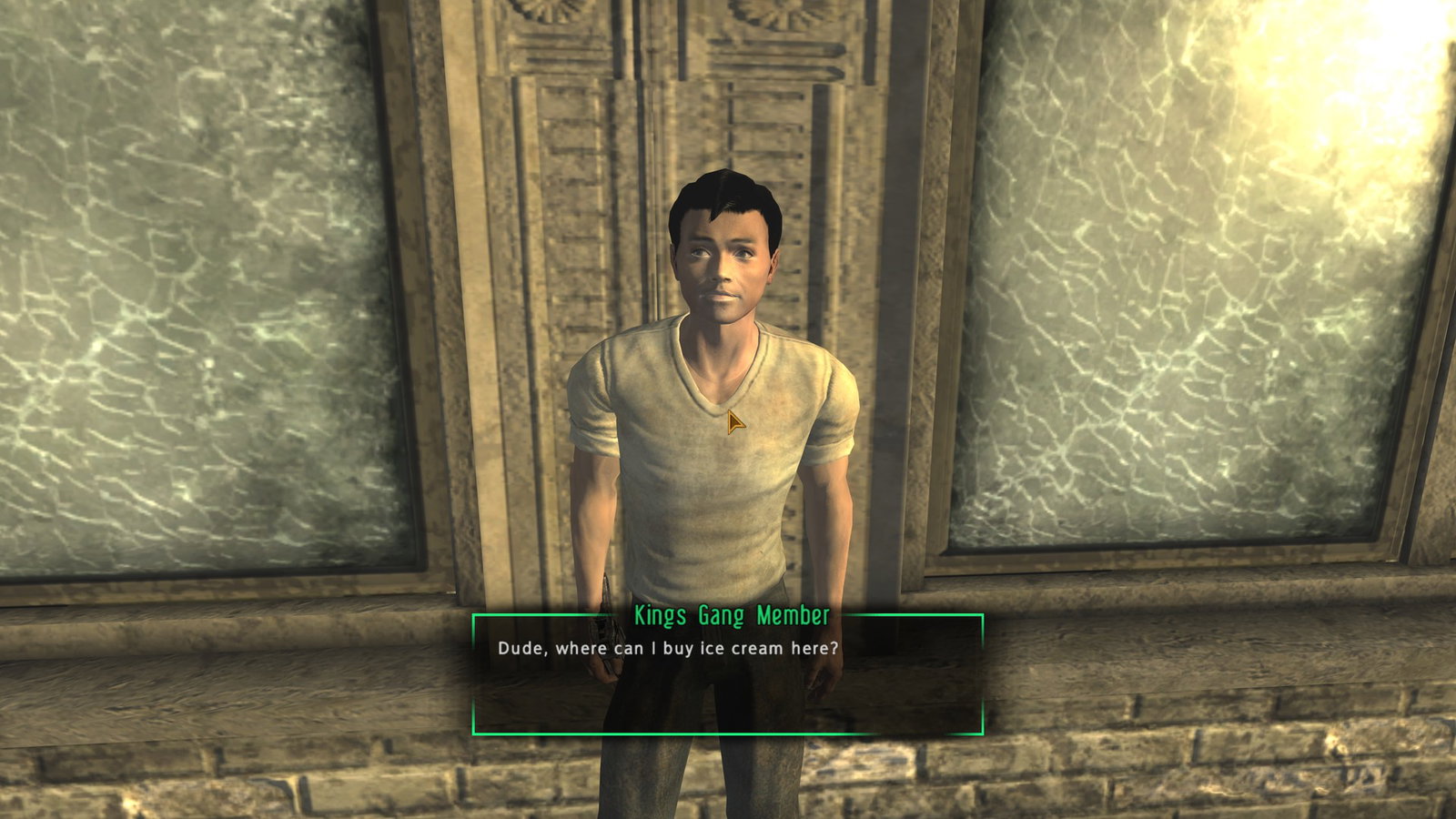
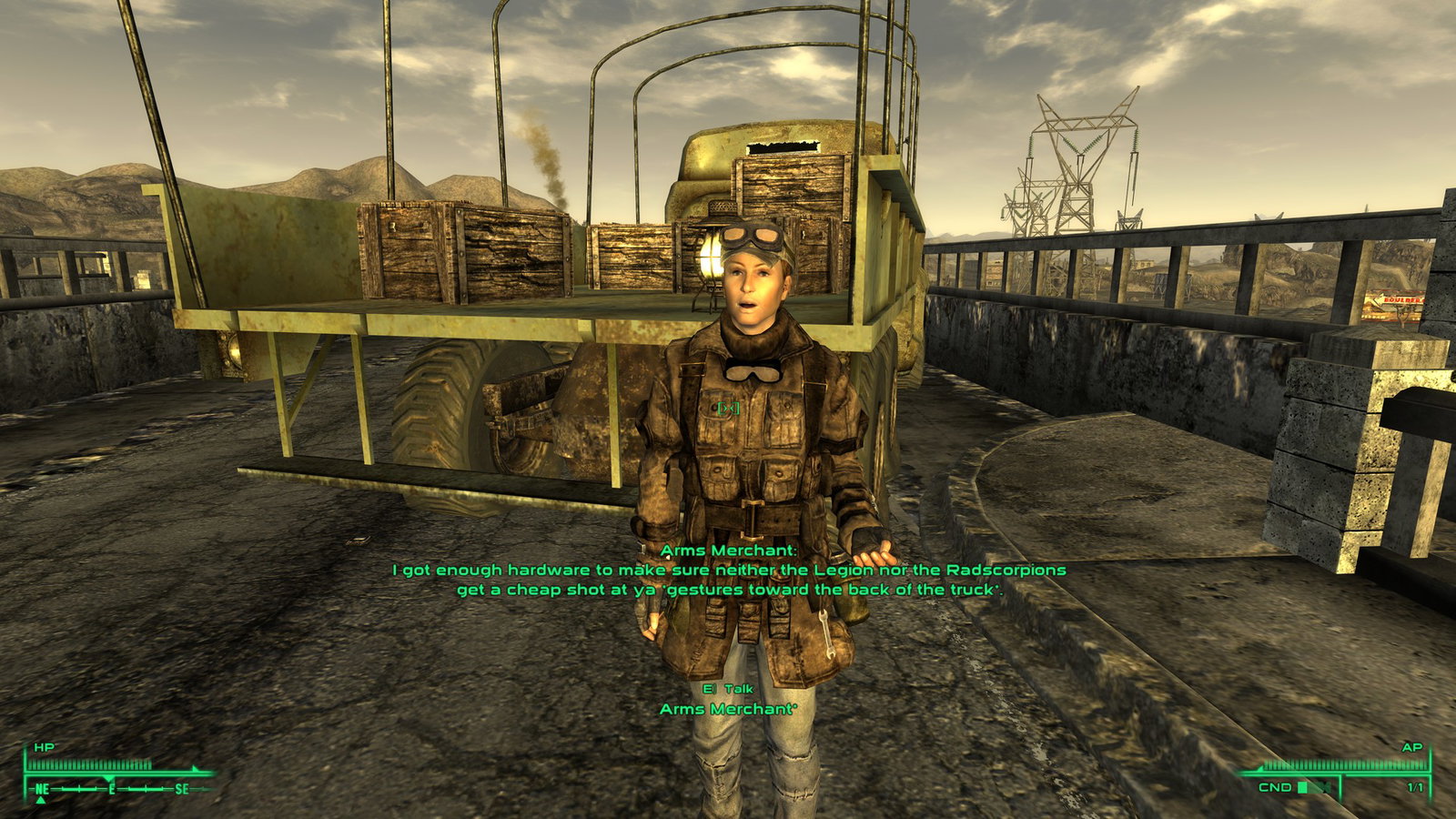
Almost any NPC can hold an unscripted conversation answering in character, with voice cloning, lip-sync, and subtitles. They remember what you did together across play sessions, form opinions of you, talk to each other, perform some actions.
Requires LLM access - a cloud API, OR a model running on your PC.
What it does
What NPCs can do
Quick start
The initial release focuses primarily on AI companions. NPC-to-NPC conversation is a partially enabled feature: companions may talk to each other, but the chance of a conversation between other NPCs is set to 0 by default — I feel it needs a bit more polish (raise iOnNPCHello to enable it). Companions can technically talk to other NPCs, but are currently discouraged from doing so.
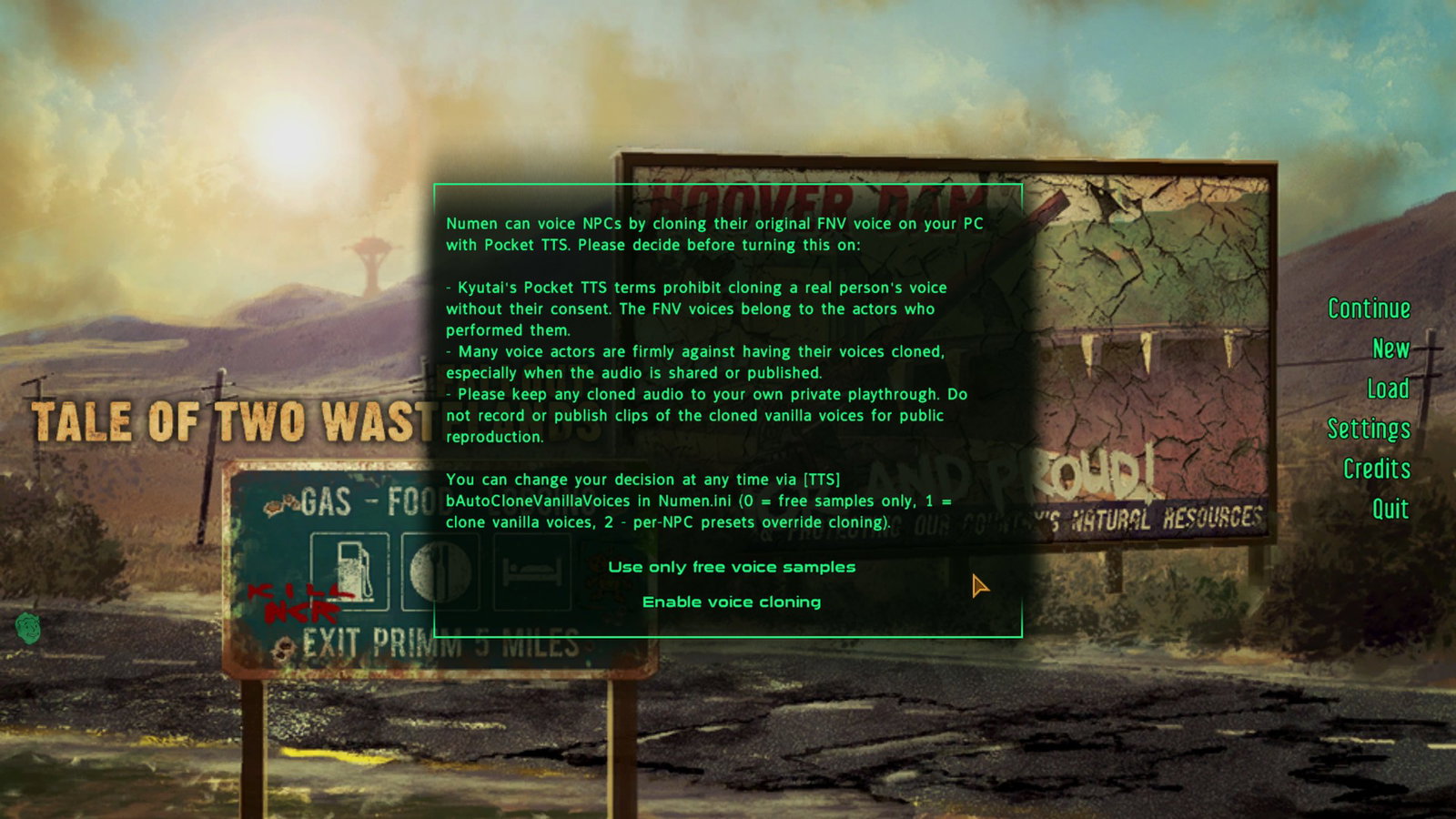
If anything is misconfigured, Numen shows a message at the main menu telling you exactly what to fix.
The base mod ships ready to talk: it includes the Pocket TTS engine with opt-in voice cloning support. Extra voice presets and models are optional separate downloads.
Configuration is located in two INI files under Data\NVSE\Plugins\Numen\:
Available TTS options:
Your companions can remark on new places, finished quests, deaths, trades, and discoveries — and they can strike up conversations with each other.
An NPC can take real actions in the world:
Actions are context-gated so they make sense — companions react to the moment, relationship changes are earned gradually, and nothing fires randomly.
NPCs are not your yes-men — do not expect them to mindlessly follow your orders. No established trust, no loyalty.
Almost any NPC can hold an unscripted conversation answering in character, with voice cloning, lip-sync, and subtitles. They remember what you did together across play sessions, form opinions of you, talk to each other, perform some actions.
Requires LLM access - a cloud API, OR a model running on your PC.
A demo of the initial release. Since then Numen received voice input and voice cloning support, a new video is coming soon.
What it does
- Talk to almost any NPC — talk via voice input, or point at an NPC and press the Grab key.
- Fully voiced — neural TTS with automatic opt-in voice cloning, plus the ability to assign voices per NPC and/or voice type.
- Multiple kinds of input — text input, voice input, dictation into the text input.
- Built-in companion system — recruit whoever you like with wheel menu support. JIP CCC is supported.
- Choose your provider — works with local models (LM Studio, llama.cpp, Ollama, vLLM) or cloud APIs (OpenRouter, Gemini, MiniMax, and other compatible services). You can specify multiple models as a fallback chain or use them in random order to balance load.
- No sidecar app — no external program to keep running. It does start a local TTS server, but shuts it down automatically.
What NPCs can do
- Comment — when you enter a new location, get a new objective, or trade items, they may voice their opinion. There are a dozen auto-triggers in all, and the comment chance is configurable per trigger.
- Remember — persistent, per-NPC long-term memory. They remember places, people, and your shared history.
- Think — besides what they tell you, they have an inner voice that gives subtext to what they say.
- Feel — evolving trust, romance, and mood. Relationships you earn or burn over time. If you piss a companion off, they may leave you, and it may be difficult to persuade them to come back.
- Act — recruit and dismiss companions, trade, accept gifts, equip armor and weapons, give you items, start a fight, romance — driven by what the NPC decides to do.
- Converse — vanilla NPCs constantly greet each other, but these greetings rarely go anywhere. Numen detects them and starts a conversation between two AI NPCs with separate contexts — there are no pre-defined scenarios, and neither knows what the other is going to say.
- Lie — such a human concept, but yes, they can pretend and lie, too.
- Relax — companions automatically go into a sandbox mode in home and safe locations.
Quick start
- Install xNVSE, JIP LN NVSE, and Numen.
- Open Data\NVSE\Plugins\Numen\Agent.ini and point it at your model — a local server address, or a cloud provider's API key and model name.
- Launch the game, aim at any NPC, press the Grab key (Z by default), and start talking.
The initial release focuses primarily on AI companions. NPC-to-NPC conversation is a partially enabled feature: companions may talk to each other, but the chance of a conversation between other NPCs is set to 0 by default — I feel it needs a bit more polish (raise iOnNPCHello to enable it). Companions can technically talk to other NPCs, but are currently discouraged from doing so.
Requirements
Required
An endgame NPC prompt is about 13k tokens. Models with concise output will work comfortably with 20k model context. Overthinking models like Qwen may need up to 30k and generally are not recommended in slow setups due to increased delay (you have to wait until they finish streaming their chain of thought).
Recommended
Compatibility
- English version of Fallout: New Vegas.
- xNVSE
- JIP LN NVSE
- An LLM endpoint (Gemma 4 12B or higher) — local or cloud. See "Choosing your AI brain." The mod does nothing until you connect a model; this is the one piece you must set up yourself.
An endgame NPC prompt is about 13k tokens. Models with concise output will work comfortably with 20k model context. Overthinking models like Qwen may need up to 30k and generally are not recommended in slow setups due to increased delay (you have to wait until they finish streaming their chain of thought).
Recommended
- JohnnyGuitar NVSE — slightly improves spatial awareness via always-loaded Editor IDs.
Compatibility
- JIP Companions Command & Control (CCC) — if installed, Numen uses JIP CCC follow packages.
Installation
- Install the requirements above. A mod manager (MO2 recommended) keeps everything tidy.
- Install Numen with your mod manager and enable Numen.esp in your load order.
- Set up your LLM configuration — edit Agent.ini (next section).
If anything is misconfigured, Numen shows a message at the main menu telling you exactly what to fix.
The base mod ships ready to talk: it includes the Pocket TTS engine with opt-in voice cloning support. Extra voice presets and models are optional separate downloads.
Configuration is located in two INI files under Data\NVSE\Plugins\Numen\:
- Agent.ini — which model(s) to use and where: endpoints, API keys, fallback chains, timeouts.
- Numen.ini — gameplay tuning: the talk key, TTS backend and voices, how often companions comment, NPC-to-NPC chance.
Available TTS options:
- Pocket TTS (default) — fast voice cloning.
- sherpa-onnx (Piper, Kokoro, KittenTTS) — a multi-engine option for users who want to set it up. NVIDIA users can install CUDA support for significant speedup.
Choosing your AI brain (the important part)
Numen does not include an AI model. You pick one and point the mod at it in:
Data\NVSE\Plugins\Numen\Agent.ini
There are two routes — choose one or both.
Use a cloud API — easiest, costs pennies, no hardware needed
Sign up with a provider, then paste your API key and model name into Agent.ini. Numen speaks both the OpenAI and Anthropic request formats supported by most conversation models, so OpenRouter, Hugging Face, Google AI Studio, and most other hosted services work. Sort models on OpenRouter by price per 1M tokens to understand how much using a paid model costs, or chain free offerings.
Run it locally — free, private, offline
Install a local server such as LM Studio, llama.cpp, Ollama, or vLLM, load a chat model, and point Agent.ini at its address. A decent GPU is recommended. Gemma 4 12B (unsloth/gemma-4-12b-it-qat) responds in about 2 seconds in my testing — on a machine with 32 GB of DDR5-6000 RAM and a 16 GB RTX 5070 Ti.
You can mix and match: a cheap, fast model for ambient chatter and a smarter one for real conversations. See examples in Agent.ini.
The mod also supports multi-agent configuration — assign multiple models per type, and it automatically balances between them or falls back when one is overloaded. For example, try the cloud first, fall back to a local model if it is down.
Data\NVSE\Plugins\Numen\Agent.ini
There are two routes — choose one or both.
Use a cloud API — easiest, costs pennies, no hardware needed
Sign up with a provider, then paste your API key and model name into Agent.ini. Numen speaks both the OpenAI and Anthropic request formats supported by most conversation models, so OpenRouter, Hugging Face, Google AI Studio, and most other hosted services work. Sort models on OpenRouter by price per 1M tokens to understand how much using a paid model costs, or chain free offerings.
Google quick start - free tier models (500/1500 requests per day)
- Go to https://aistudio.google.com/api-keys
- Press "Create API key" in the top right corner.
- Choose "Create project", fill the single input with any name.
- Create and copy a new API key.
- Open the default Agent.ini and fill in all four empty sAPIKey values with your key.
- Done.
Keep in mind - free offerings run at capacity, they are slow and are often inaccessible (that's why Numen offers multi-agent configuration).
- Press "Create API key" in the top right corner.
- Choose "Create project", fill the single input with any name.
- Create and copy a new API key.
- Open the default Agent.ini and fill in all four empty sAPIKey values with your key.
- Done.
Keep in mind - free offerings run at capacity, they are slow and are often inaccessible (that's why Numen offers multi-agent configuration).
Run it locally — free, private, offline
Install a local server such as LM Studio, llama.cpp, Ollama, or vLLM, load a chat model, and point Agent.ini at its address. A decent GPU is recommended. Gemma 4 12B (unsloth/gemma-4-12b-it-qat) responds in about 2 seconds in my testing — on a machine with 32 GB of DDR5-6000 RAM and a 16 GB RTX 5070 Ti.
LM Studio quick start
- Go to lmstudio.ai, download and launch the application.
- In the left sidebar, press "Model Search".
- Find and download unsloth/gemma-4-12b-it-qat
- Switch to "Developer" on the left side, it will open on "Local Server".
- Start the server (the toggle is next to the "Server Settings" button at the top). This enables access to the model via the API.
- Press "+ Load Model".
- Gemma 4 will be the only model in the list, select it.
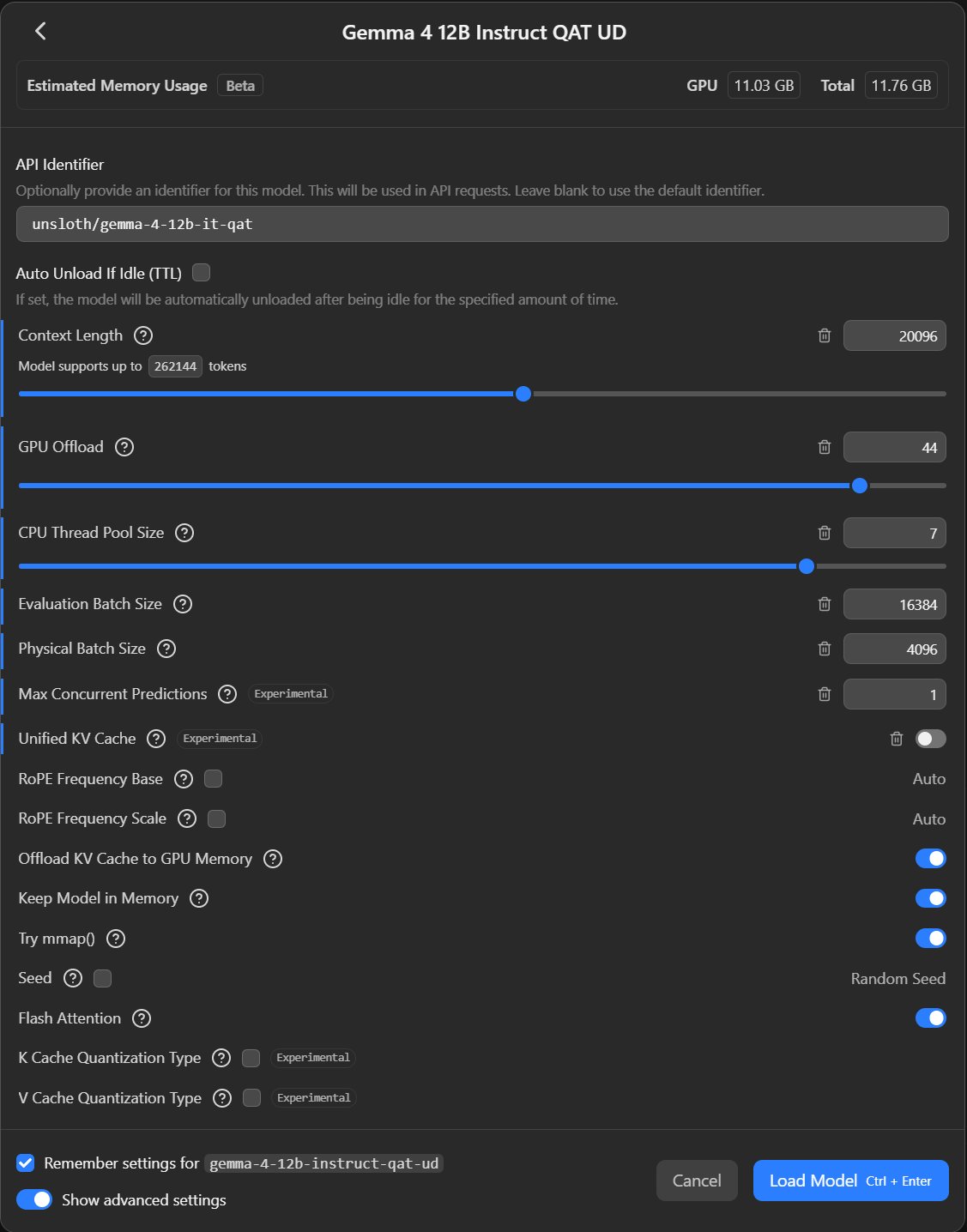
- Increase Context Length to 20,000. Other parameters I am using.
- Press "Load Model".
- Your model is running — go to Agent.ini and uncomment the [Agent.LMStudio] example.
- Set [General] DialogAgent/BarkAgent/MemoryAgent to LMStudio.
- Done.
- In the left sidebar, press "Model Search".
- Find and download unsloth/gemma-4-12b-it-qat
- Switch to "Developer" on the left side, it will open on "Local Server".
- Start the server (the toggle is next to the "Server Settings" button at the top). This enables access to the model via the API.
- Press "+ Load Model".
- Gemma 4 will be the only model in the list, select it.
- Increase Context Length to 20,000. Other parameters I am using.
- Press "Load Model".
- Your model is running — go to Agent.ini and uncomment the [Agent.LMStudio] example.
- Set [General] DialogAgent/BarkAgent/MemoryAgent to LMStudio.
- Done.
You can mix and match: a cheap, fast model for ambient chatter and a smarter one for real conversations. See examples in Agent.ini.
The mod also supports multi-agent configuration — assign multiple models per type, and it automatically balances between them or falls back when one is overloaded. For example, try the cloud first, fall back to a local model if it is down.
Interaction with NPCs
- Open a conversation — aim at an NPC and press the Grab key (Z by default). A text box opens. You can rebind this to any key in the config.
- Say anything — type your line and press Enter. The world keeps running (no pause), and the NPC's reply streams in with voice and subtitles. An animated "thinking" indicator shows it is working.
- Keep chatting — the prompt reopens automatically so you can carry on. Press Tab (or submit an empty line) to end the conversation.
- Quick commands — type /hire or /fire in the prompt to recruit or dismiss the NPC you are talking to, instantly, without using the AI.
Your companions can remark on new places, finished quests, deaths, trades, and discoveries — and they can strike up conversations with each other.
An NPC can take real actions in the world:
- Join or leave your party — recruit almost anyone; they can also choose to leave if you push them too far.
- Trade — open a share/trade window, accept a gift, or hand you a specific item from their inventory.
- Manage gear — equip or remove specific armor and weapons, or strip down.
- Fight you — turn hostile if you insult or threaten them.
- Build a relationship — trust, romance, and mood shift based on how you treat them, paced over time so they never flip on a dime. Optional intimacy is supported and can be ignored entirely.
Actions are context-gated so they make sense — companions react to the moment, relationship changes are earned gradually, and nothing fires randomly.
NPCs are not your yes-men — do not expect them to mindlessly follow your orders. No established trust, no loyalty.
Long-term memory
Every conversation-capable NPC keeps a personal, long-term memory file that persists across save games. Over time, an NPC accumulates:
Memory is compressed in the background by a model, so even small local models stay grounded and consistent.
NPCs may overhear you and each other — they hear and remember what happens around them, and may bring it up later with you or another NPC.
Memory files are stored as
- A journal of what happened — meetings, promises, conflicts, milestones.
- Catalogs of the places, people, and storylines they have come to know.
- Their own personality notes and personal goals.
- Their relationship with you — trust, romance, mood — and a running log of why it changed.
Memory is compressed in the background by a model, so even small local models stay grounded and consistent.
NPCs may overhear you and each other — they hear and remember what happens around them, and may bring it up later with you or another NPC.
Memory files are stored as
{GameDir}\Numen\NPCContext\{PluginName}\{FormID:6}.txtGiving NPCs a personality
NPCs know general information about themselves — name, faction, original location. By default, an NPC improvises a personality from who they already are so Numen works on every eligible NPC with zero setup.
To hand-author a character, drop a plain text file describing them at:
Numen includes short backstories for more than 2800 vanilla NPCs across both wastelands by default.
Numen also ships with a large, spoiler-free world glossary so NPCs know the wasteland's people, places, and gear without being told. You can add your own .txt files to extend it.
To hand-author a character, drop a plain text file describing them at:
Data\NVSE\Plugins\Numen\Context\Backstories\english\{ModName}\{FormID:6}.txtData\NVSE\Plugins\Numen\Context\Backstories\english\FalloutNV.esm\104E85.txtNumen includes short backstories for more than 2800 vanilla NPCs across both wastelands by default.
Numen also ships with a large, spoiler-free world glossary so NPCs know the wasteland's people, places, and gear without being told. You can add your own .txt files to extend it.
Compatibility
- Built around engine hooks in the popular NVSE plugins; designed to sit cleanly in a typical FNV or TTW setup.
- Plays nicely with vanilla companions (Boone, Veronica, ED-E, …) — Numen leaves their own follower scripts alone and simply adds ambient life on top, while letting you recruit anyone else into your party.
- Optional JIP CCC integration for companion management.
- TTW is compatible. I do recommend explaining to your companions that you are going to the Mojave. They may get confused by the displacement of time and space (Lucy West thought we fell into a parallel universe!). Tell them they have amnesia after being shot in the head :)
Limitations
A few caveats worth knowing:
- It is only as good as your model — coherence, staying in character, and response speed all depend on the LLM and the hardware/endpoint you point it at. Even strong models occasionally hallucinate, forget, or step on lore — that is the nature of the tech, not a bug you can fully tune out. And a lower-tier but large LLM like MiniMax 2.7 still shows noticeably richer vocabulary, better creative writing, and a better grasp of nuance in speech than a small local model.
- No talking to children — I hope I don't have to explain this.
- People only, mostly — humans can converse; creatures and robots generally cannot in the Fallout universe. The exceptions are a small built-in whitelist (DC robo-butlers, and the companions Fawkes and Lily).
- English / ASCII — the prompts, the world glossary, and the bundled voices are English, and the game's subtitle renderer is ASCII-only. A model replying in another language (or with fancy typography) will show up garbled.
- There is a wait — every reply is a round-trip to the model plus voice synthesis. A "thinking" indicator covers it, but expect a short pause — longer on slow local hardware or a busy free endpoint.
- Vanilla companions stay vanilla — Boone, Veronica, Arcade Gannon and friends can be talked to like anyone else, but you still hire and dismiss them through their own normal dialogue; Numen does not take over their scripted follower system.
- NPC-to-NPC is early — companions chat with each other, but conversations between ordinary NPCs are off by default while the feature gets more polish.
Troubleshooting
- NPCs don't reply / "request failed" — the Agent.ini endpoint is wrong, the local server isn't running, or the API key / model name is off. Numen flags configuration problems at the main menu; full details go to Numen.log in your game folder.
- Subtitles appear but there's no voice — the TTS engine didn't start. Check the [TTS] section of Numen.ini and the log.
- Read the log first — Numen.log (alongside your Agent.ini settings) answers the large majority of setup questions.
- Crashes with logs mentioning video card drivers — you have run out of VRAM resources.
Uninstallation
1. Dismiss your Numen companions first. Talk to each companion you recruited through Numen and type /fire. That hands them back to the game in their normal state.
2. Disable Numen's DLL plugin. All of the mod's behavior lives in NVSE\Plugins\Numen.dll. Hide or remove the DLL file rather than disabling the whole Numen mod, so the ESP stays in place. The ESP contains no moving parts and without the DLL it does nothing.
Leave Numen.esp enabled. Disabling or removing an ESP from a save you are still playing is highly discouraged. Only drop the ESP entirely if you are starting a fresh game.
2. Disable Numen's DLL plugin. All of the mod's behavior lives in NVSE\Plugins\Numen.dll. Hide or remove the DLL file rather than disabling the whole Numen mod, so the ESP stays in place. The ESP contains no moving parts and without the DLL it does nothing.
Leave Numen.esp enabled. Disabling or removing an ESP from a save you are still playing is highly discouraged. Only drop the ESP entirely if you are starting a fresh game.
Credits
Created by Eddoursul.
Bundles forks of Kyutai's Pocket TTS (MIT) and sherpa-onnx without espeak-ng (Apache-2.0).
espeak-ng (GPL-3.0) is distributed separately with the voice packs requiring it, built from the upstream https://github.com/csukuangfj/espeak-ng
See the included THIRD-PARTY-LICENSES and GPL-3.0 files.
Uses Moonshine (MIT) for voice input.
No code was used but existing RE saved time thanks to NVSE, JIP-LN, JohnnyGuitar, and lStewieAl's Tweaks developers.
Bundles forks of Kyutai's Pocket TTS (MIT) and sherpa-onnx without espeak-ng (Apache-2.0).
espeak-ng (GPL-3.0) is distributed separately with the voice packs requiring it, built from the upstream https://github.com/csukuangfj/espeak-ng
See the included THIRD-PARTY-LICENSES and GPL-3.0 files.
Uses Moonshine (MIT) for voice input.
No code was used but existing RE saved time thanks to NVSE, JIP-LN, JohnnyGuitar, and lStewieAl's Tweaks developers.