Landscape Seam Fixer
Summary
A standalone tool for Skyrim Special Edition / Anniversary Edition that finds and fixes landscape seams — the cracks, cliffs, and holes that appear where two mods independently edit neighboring worldspace cells' terrain (LAND/VHGT) and the shared edge no longer lines up. No Creation Kit work require
License
Tags
Language
Landscape Seam Fixer v2
⚠ If you're upgrading from v1.x: Delete your old LandscapeSeamFixes.esp and LandscapeSeamReport.csv before regenerating, and remove the old esp from your load order before enabling the new one. The fixing approach changed completely — a stale old file can reintroduce exactly what this version fixes.
This will not Fix 100% of seams but it will get you darn close.
DO NOT SELL.
“But he was pierced for our transgressions,
he was crushed for our iniquities;
the punishment that brought us peace was on him,
and by his wounds we are healed.”
Isaiah 53:5
Rebuilt fixing approach, Northern Roads / water / custom trust support
Find and fix landscape seams caused by conflicting mod terrain edits - no Creation Kit required.
This is a standalone PC utility, not a plugin you drop in your Data folder. Run it once against your load order and it generates a small patch plugin for you to install like any other mod.
⚠ If you're upgrading from v1.x: Delete your old LandscapeSeamFixes.esp and LandscapeSeamReport.csv before regenerating, and remove the old esp from your load order before enabling the new one. The fixing approach changed completely — a stale old file can reintroduce exactly what this version fixes.
This will not Fix 100% of seams but it will get you darn close.
Author's Note
During my initial testing I used Riverwood Forest paired with multiple mods. If you ever used Riverwood Forest then you know you will get holes and seams all over the place, and it's such a beautiful mod it's worth the headache. Some images were added for your viewing.
The Problem
Run enough landscape and terrain mods together and you'll eventually see it: a crack running along a cell border, a cliff that shouldn't be there, or a hole you can fall through.
This happens when two mods each edit the terrain of neighboring worldspace cells independently. The game loads whichever mod wins each cell, but the two winning cells' shared edge no longer lines up, because neither mod knew about the other's edit.
Fixing this normally means opening the Creation Kit, manually finding every seam, and nudging vertices by hand - for one cell at a time, across a whole load order.
How v2.0.0 Fixes It - New In This Version
The tool no longer tries to blend mismatched terrain between cells. It now restores the exact data a trusted mod authored wherever another plugin silently buried it.
This is both safer and fixes cases the old blending approach couldn't, like when a trusted mod's own compatibility patch gets overwritten by a plainer, unpatched version of the mods it reconciles.
Features
Detection & Reporting
- Scans your entire resolved load order and produces a full report as a CSV of every cell edge where terrain heights disagree. Lists worldspace, cells, which plugin owns each side, and severity.
Trusted Mod Restoration (Terrain)
- Instead of guessing, the tool trusts specific mods you choose and restores their authored terrain. The fix is a separate, standalone patch plugin.
- Trusted by default:
- UniqueLocationsRiverwoodForest.espLux Via
- Opt-in trust:
- Northern Roads — When enabled, has full priority over other trusted mods for cells it touches. Plus automatic detection of its own compatibility-patch hub, prioritized above both Northern Roads and whatever it's patching.
Automatic Compatibility-Patch Detection
- Patches named - ... are now recognized and trusted automatically for every trusted mod. No waiting on updates for new patches. Legacy of the Dragonborn's DBM_ / LOTD_-prefixed patches are also covered.
Water Mod Restoration — New Separate System
- A fully separate system that only touches water records, never terrain. Supports CS Water Mod, Water for ENB, and RealisticWaterTwo, each independently toggleable, in that priority order: CS Water Mod > Water for ENB > RealisticWaterTwo.
Custom Trusted Plugins
- Add your own via a simple text box — exact plugin name or a whole patch family.
Quality of Life
- Settings are now remembered — no more re-entering your setup every time you open the app.
- Works with Mod Organizer 2, Vortex, or a plain Data folder. It reads MO2's own profile files directly, so you don't need to launch it through MO2 at all.
- No changes to your mods. Remove the generated patch any time with zero side effects.
Requirements
Installation
This tool is not itself a mod. Don't install the tool's own download through your mod manager.
- Extract the download anywhere on your PC, not inside your game's Data folder.
- Run SeamFinder.UI.exe.
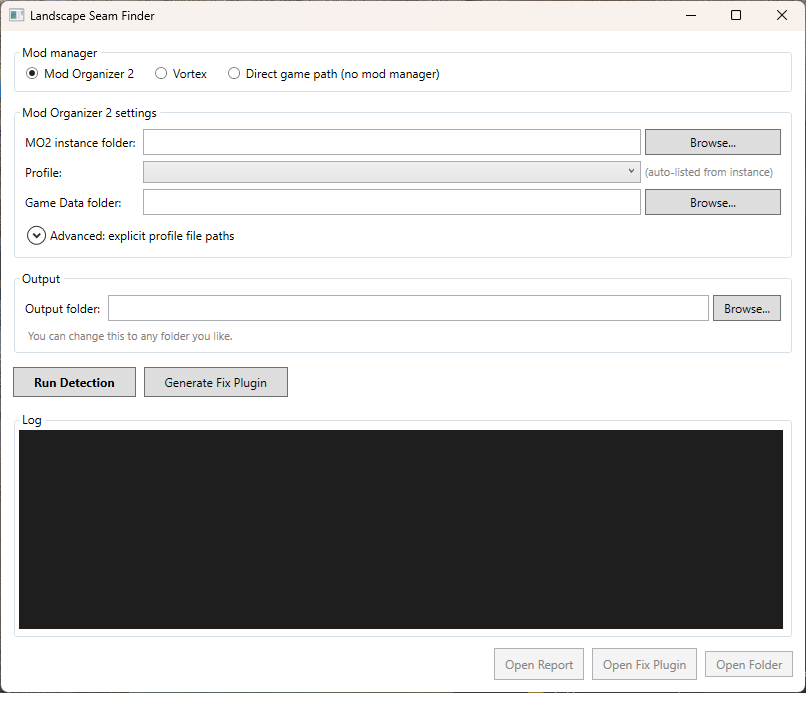
- Choose how your mods are managed — Mod Organizer 2 (point it at your instance folder), Vortex (auto-detect, or point at your Data folder), or Direct (no manager).
- Select your trusted mods (Northern Roads, water mods, custom trust).
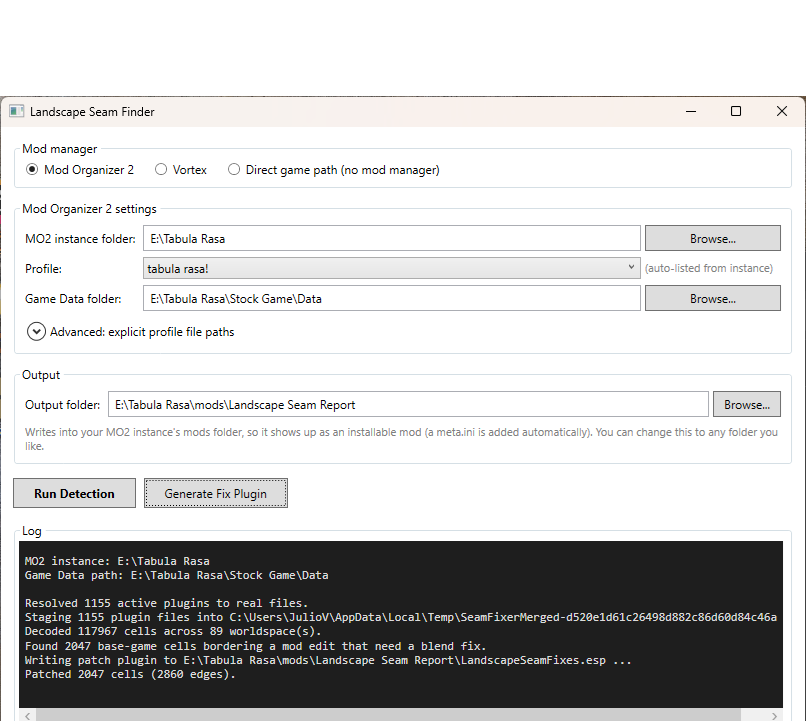
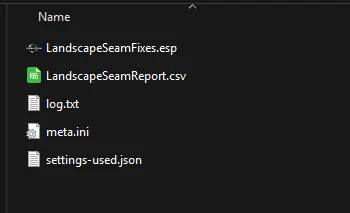
- Click Generate Fix Plugin. It writes LandscapeSeamFixes.esp into an output folder. If you're using MO2 it defaults to a proper MO2 mod folder.
- Enable the generated plugin in your mod manager like any other mod, and give it a late / high-priority load order position. It needs to load after the mods it's correcting.
Optional but recommended: Click Run Detection too. It writes a full LandscapeSeamReport.csv you can look through.
Usage Tips
- Re-run it any time your load order changes. The plugins that own each seam can change, so the fix should be regenerated to match.
- Test in-game at a few spots before trusting it broadly.
- It's safe to just remove LandscapeSeamFixes.esp if anything looks wrong. It doesn't touch your other mods.
- Always keep a backup of your load order and a save before trying a new terrain patch.
- Yes, the CLI works and got extended this session too. see github
- I would recommend to you The Vault its a backup system for MO2 modeled after time machine. good for list authors as a way to back up prior to wabbajack (not a replacer but a tool to use with it)
FAQ
Will this conflict with my other mods?
No. It only restores the exact records your trusted mods authored, at the cells it detected as buried.
Do I need to keep the tool installed?
No. Once it's generated LandscapeSeamFixes.esp and you've installed that, the tool itself doesn't need to run again unless your load order changes.
Does this fix collision and navmesh too, or just visuals?
It patches the actual terrain height data, LAND and VHGT records, at the plugin level, the same data the game uses for collision. Not a runtime visual-only hack.
Is this safe to use mid-playthrough?
Adding a new plugin that only edits landscape/water data is generally as safe as any other terrain mod, but as always, back up your save first.
Credits
Permissions
DO NOT SELL.
“But he was pierced for our transgressions,
he was crushed for our iniquities;
the punishment that brought us peace was on him,
and by his wounds we are healed.”
Isaiah 53:5